


Monday, 24 March 2014


Saturday, 22 March 2014
Advice from an Apple Tech: BitTorrent and older OS X installation discs
If you service Macs on a regular basis, sooner or later, you’ll absolutely need an older Mac OS X installation disc to complete a project that’s due in a very short amount of time.

Friday, 21 March 2014
Making an iOS app about Steve Jobs? Think different, Apple says

Bad news, developers: If you had planned on having a mobile app take you down the road to wealth and fame, don’t expect to have Steve Jobs riding shotgun—at least not if you’re looking to reach Apple’s iOS App Store.

That’s the word from both Re/code and Cult of Mac, which told the story of brothers John and Grant Gill, who had hoped to build an app that served up inspirational quotes from Apple’s co-founder and former CEO. The app, dubbed Quoth Steve, would follow the quote-a-day model, meaning 365 reminders that real artists ship and that you should consider staying hungry and/or foolish.
There was just one thing standing between Quoth Steve and the top of the App Store download charts—Apple. The company allegedly told the Gills that it doesn’t approve Steve Jobs-themed apps for sale in its iTunes store. (Books about Apple and Steve Jobs that the current CEO has dismissed as “nonsense?” Sure! But not apps.)
Stories about comprehensive bans on types of apps crop up all the time, but that doesn’t necessarily mean they reflect a company’s actual policy—just last month we heard reports that Apple and Google were cracking down on Flappy Bird clones and yet, you’ll still find plenty of knockoffs littering the App Store. That said, Apple’s app emporium does in fact seem free of Steve Jobs-themed fare, though the maker of Do You Know Steve Jobs may want to reveal how that trivia app made it past the App Store’s gatekeepers.
At any rate, the Gills told Cult of Mac that there’s no hard feelings toward Apple, and they’ve released Quoth Steve in Web form. So everyone—the app makers, Apple, anyone wanting 365 days worth of Steve Jobs’s quotes in a convenient mobile format—got something out of this whole deal.
Still, you must understand how shocking Apple’s “no Steve Jobs-themed” apps position is to technology reporters, many of whom make an entire living out of Steve Jobs-themed content. (Interesting fact: “Steve Jobs would never have done that” stories accounted for nearly a third of our industrial output in 2013. [We checked. This is not actually a fact.—Ed.]) And it’s the app users who suffer the most—the poor, deprived iPhone and iPad owners who can choose from any one of a million or so apps for their iOS devices, but will never know the satisfaction of any of these Jobs-centric mobile delights.
TweetSteve: Post from Twitter with this mobile client that reduces the 140-character limit to 25 characters, so you can better replicate the Apple co-founder’s straight-to-the-point replies. (“Yep.” “No.” “You’re holding it wrong.”)
Keynote: Steve Jobs Edition: This mobile add-on to Apple’s presentation software comes preloaded with templates of Steve Jobs’s most famous presentations so that you can either replicate his spellbinding style—“Everyone, on any slide where it says ‘New iPhone,’ just pretend that it reads ‘Mid-Year Sales Campaign’ instead”—or steal all of his ideas for your own. This app would beextremely popular among Samsung executives.
What Would Steve Wear: Don’t waste valuable time each morning stressing over how to dress. Just launch this app, and within seconds, it will plot out your wardrobe for you. (“Black shirt. Jeans. Again.”)
How to Tim Cook Everything: The well-received cookbook app gets an Apple-sized twist, as Steve Jobs’s successor promises you a delicious meal sometime in the next 12 to 18 months. Sadly, the app is notoriously tight-lipped about what ingredients you’ll need until right before dinner.

Flappy Steve: Well, it seems like the popular thing to do these days. Plus in this version, you yell at the pipes to get out of your way. And they’ll listen, if they know what’s good for ‘em.
Tuesday, 18 March 2014
Bugs & Fixes: OS X 10.9.2 and the disappearing camera
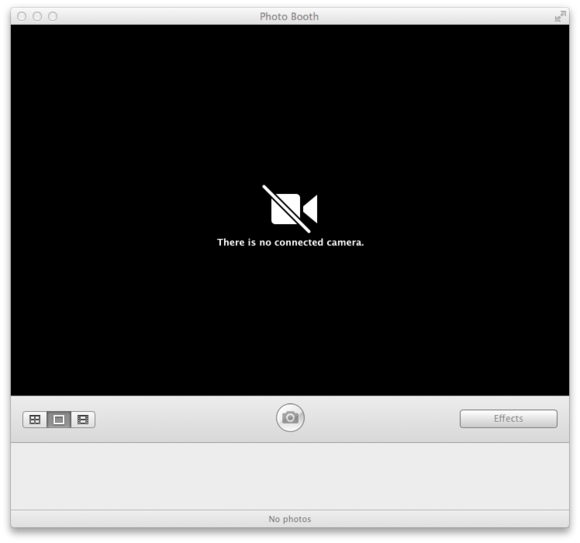
Initially, after updating to OS X 10.9.2, all seemed fine with my 2009 Mac Pro. Then I launched Skype. The application could no longer detect the camera built into my 24-inch Cinema Display. I quickly confirmed that this failure was not specific to Skype. It extended to all programs that accessed the camera—notably Apple’s FaceTime and Photo Booth. For example, shortly after launching Photo Booth, a message appeared that said “There is no connected camera.”
A Safe Boot points the way
The symptom was not limited just to my account; the camera remained MIA even when logged into a separate account that had no login items. Recommended all-purpose fixes—such as restarting the Mac, resetting the SMC (System Management Controller), or repairing disk permissions—had no effect. I even re-installed OS X 10.9.2 via the combo update but to no avail.
I was able to determine that the symptom did not extend beyond my Mac Pro. The cameras in my MacBook Pro and my wife’s iMac continued to work just fine after installing the 10.9.2 update.
One thing did succeed in bringing the Cinema Display’s camera back to life: a Safe Boot. It was only a temporary respite, however. After restarting normally, the camera vanished again. Still, this pretty much ruled out a hardware failure as the cause of the problem. Rather, the evidence suggested that the culprit was a file (or files) either in the Mac Pro's /Library or /System/Library folders. Unfortunately, a Safe Boot offers no way to determine precisely what those files might be. As a start in this search, I temporarily disabled the contents of various startup-related folders in the /Library folder: Extensions, LaunchDaemons, LaunchAgents, Preferences and StartupItems. It proved fruitless.
VDCAssistant crashes
Perhaps OS X’s Console logs could identify the culprit file? Nope. If anything, checking the logs only succeeded in raising my anxiety. It revealed that a process called VDCAssistant was crashing at a rate of about ten times a second! I located this OS X file buried in/System/Library/Frameworks/CoreMediaIO.framework/Versions/A/Resources/VDC.plugin/Contents/Resources.

I figured that, while this VDCAssistant file was likely involved in the missing camera mystery, it was not the root cause. This meant that killing the process might stop the crashes but would not bring back the camera. Still, I attempted the kill. Surprisingly, neither the
killall command in Terminal nor a Force Quit from Activity Monitor could terminate the process. At this point, I searched the web and found a report that claimed deleting com.apple.cmio.VDCAssistant.plist from/System/Library/LaunchDaemons would stop the crashing but (as I expected) not restore the camera. I never bothered to try this.AirParrot, AirPlay mirroring, and the missing camera solution
Admitting defeat, I called Apple Technical Support. They had me perform one additional diagnostic test: remove third-party kext files from the/System/Library/Extensions folder. This too had no effect. The support person next had me download an app called Capture Data which collects and sends data from your computer to Apple. He promised Apple would get back to me in a few days, after analyzing the results.
While waiting for Apple’s return call, I did some further digging into problems with OS X 10.9.2. One Apple Support Communities thread especially grabbed my attention. It reported that AirPlay mirroring no longer worked for some users after updating to OS X 10.9.2. The cause turned out to be AirParrot—a program that mirrors a Mac’s display to Apple TV via AirPlay. It's especially useful for older Macs that are not compatible with AirPlay mirroring. For this reason, I had AirParrot installed on my Mac Pro but not my other Macs. Hmmmm...
The suggested work-around was to uninstall AirParrot, especially any of its .kext drivers found in /System/Library/Extensions or /Library/Extensions. As I had already temporarily uninstalled all third-party kext files, including AirParrotDriver.kext, I was not optimistic that this was the solution. So, rather than proceed further, I decided to wait to see what Apple had to say.
Apple called back about a week later. They had similarly zeroed in on AirParrot, confirming a conflict between the software and OS X 10.9.2. Removing all AirParrot software was the suggested cure. Despite my pessimism, I gave it a try. However, this time, rather than manually removing the AirParrot kext file, I followed the instructions on an AirParrot support page. Specifically, I ran the AirParrot Removal Tool utility (despite an indication that the utility might not function in OS X 10.9).
Success! I'm not sure what key file the utility removed, but it worked. After a restart, my camera returned to life.
I contacted Squirrels, the developers of AirParrot, for comment. They acknowledged the issue, noting that it appears limited to AirParrot's “Extend Desktop” feature, which is the only aspect that requires kext files. I confirmed that reinstalling AirParrot without the drivers allows the software's mirroring to work without blocking the camera. Squirrels further claimed that the problem “is likely caused by an instability in Apple's own drivers. There's not much we can do about that—the fix has to come from Apple.” As such, similar software from other vendors (such as Air Display) may also exhibit the conflict. However, Squirrels promised to investigate further to see if they might somehow resolve the AirParrot problem on their end. Apple would not comment regarding a possible future fix in OS X. To see if anything happens here, we’ll likely have to wait for OS X 10.9.3. In the meantime, at least I have my camera back. Case closed.
Monday, 17 March 2014
5 quick Mail tricks everyone should know
Mail might not be perfect email client, but it’s the one most of us use.
Thursday, 13 March 2014
Microsoft will release a new version of Office for Mac this year
Microsoft will release a new office suite for the Mac before the end of this year, according to the company’s manager for Office products in Germany.
Subscribe to:
Posts (Atom)


